Vocabulary
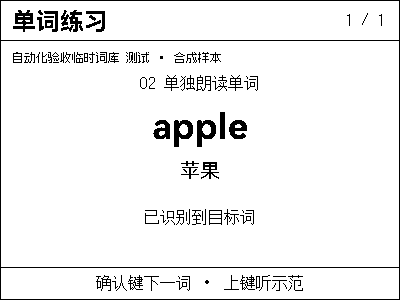
Practice vocabulary by textbook and unit: view hints, spell letters and read words on NOTE4, then listen to model pronunciation.
Local Push SDK · Public source
View & install Views0
Local app · NOTE4
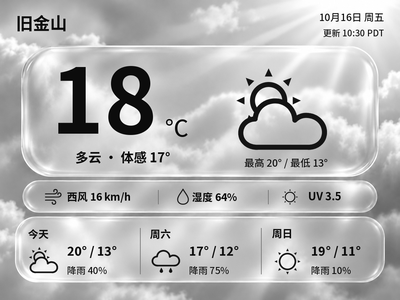
Generate Chinese or English glass-style weather cards with temperature, feels-like temperature and a three-day forecast. The current version previews and exports images on your computer first.
Install & use
Use the public SDK to build a program on your computer, then integrate your chosen plugin. A local AI can help with building and adaptation; finish by checking the result on the device.
Local Push SDK · Python 3.10+ · WeatherAPI Key
SDK builds and local tests have been verified on Apple Silicon macOS. Windows and Linux require platform validation, and each plugin’s runtime dependencies may need adaptation.
Get the public Local Push SDK, prepare Rust and build tools for your OS, and pass example builds and local tests before implementing device connection and display output. The current SDK matches NOTE4 firmware 3.7.2.
Run the weather source in a separate Python environment and configure the WeatherAPI Key and city locally. Pass the original generated PNG to your SDK-based program, then select a grayscale format for transmission.
Check the city, observation time and 400×300 preview, then confirm the target device, send the image and check the actual NOTE4 display.
Give this task to Codex or another local AI on your computer. It will prepare the SDK and local program first, then check and adapt the plugin interfaces.
Use the Local Push SDK to build a local program on my computer, then integrate and verify the features of Liquid Glass Weather.
Project repository: https://github.com/itopinion/zectrix-weather-glass
Installation guide: https://github.com/itopinion/zectrix-weather-glass/blob/main/README.md
Information checked: 2026-10-20; reference commit: 8313b20c5ba3adb22aacf49ca51f0aa0bde01d45. Recheck the current version before proceeding.
Local Push SDK: https://github.com/itopinion/zectrix-local-push-sdk
SDK API documentation: https://github.com/itopinion/zectrix-local-push-sdk/blob/main/docs/API.md
SDK compatibility manifest: https://github.com/itopinion/zectrix-local-push-sdk/blob/main/compatibility.json
Project requirements: Local Push SDK · Python 3.10+ · WeatherAPI Key
Integration approach: After the weather source generates a PNG, the local program built with the public SDK sends it to NOTE4 over your LAN.
Read the current SDK README, API documentation and compatibility manifest first. SDK 0.1.0 matches NOTE4 firmware 3.7.2 with a 400×300 canvas; it does not support NOTE4C. Check the actual device and do not upgrade firmware automatically.
1. Identify my OS and processor, check for an existing SDK and local program, and reuse them when compatible. If missing, clone the public SDK, prepare Rust, a C/C++ compiler and CMake according to the current README, and build for this computer using a path dependency.
2. Run cargo test --locked and cargo check --locked --examples first. Implement device selection, single-connection management, PNG rendering, event handling, configuration storage and shutdown cleanup. The SDK does not provide a ready-made plugin loader.
3. Read the plugin source, reuse its business logic, and adapt its rendering, device event and audio interfaces to the local program. Implement the calling interfaces or compatibility layer it needs; renaming a dependency is not successful integration.
4. Implement rendering, state management, button handling and audio in the local program as required by the plugin, and test each function. Record completed features and any issues encountered, and report what works based on the test results.
5. NOTE4 and the computer need a reachable LAN. Enable Keep Wi-Fi in standby following the SDK guide. Confirm the target device and whether another program owns its connection; do not take it over. Local device connection needs no ZECTRIX Cloud API Key; configure data-source keys separately for each plugin.
6. Submit original 400×300 PNGs and let the SDK convert to mono, gray4 or gray16; do not dither twice. Consume next_event() continuously for interaction and call close() on exit. Do not automatically reconnect or take over the device. Do not treat ResultUnknown as failure and resend an image or audio.
7. The SDK includes no ASR, TTS or language model. Configure speech backends separately when needed. Playback uses 16 kHz mono PCM16, and recording is triggered by device buttons. Perform the first device push only after the user confirms the target and preview.

Integration steps for this project:
1. Build a local program with the SDK: Get the public Local Push SDK, prepare Rust and build tools for your OS, and pass example builds and local tests before implementing device connection and display output. The current SDK matches NOTE4 firmware 3.7.2.
2. Integrate weather image generation: Run the weather source in a separate Python environment and configure the WeatherAPI Key and city locally. Pass the original generated PNG to your SDK-based program, then select a grayscale format for transmission.
3. Verify weather and the device display: Check the city, observation time and 400×300 preview, then confirm the target device, send the image and check the actual NOTE4 display.
First verification: Generate a 400×300 weather image, confirm the city, language and observation time, and check the image on NOTE4.
Report build, preview, device display-completion receipt and visual inspection separately. Provide start, stop, uninstall and update instructions, preserving existing data. Interactive apps require the computer program to keep running.
Configure accounts, keys, device addresses and personal data only locally; do not include them in shared tasks or logs. If the AI has no local execution environment, provide a build and integration plan without claiming installation.
Generate a 400×300 weather image, confirm the city, language and observation time, and check the image on NOTE4.
After installation, check the actual result on your device. Copying this task does not execute installation.
The SDK provides device connectivity. Build a local program, then integrate the plugin logic, rendering, event and audio interfaces. You can give the task on this page to a local AI.
After the weather source generates a PNG, the local program built with the public SDK sends it to NOTE4 over your LAN.
Live weather requires your own WeatherAPI Key. It retrieves weather data and is unrelated to the ZECTRIX Cloud API Key.
Practice vocabulary by textbook and unit: view hints, spell letters and read words on NOTE4, then listen to model pronunciation.
Local Push SDK · Public source
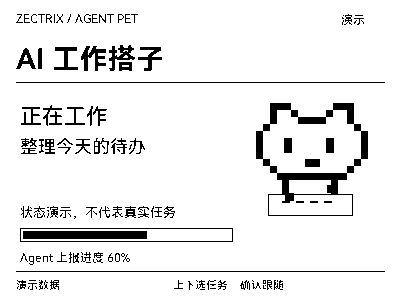
Let a pixel companion on your desk follow Codex tasks: working, waiting for attention, completed or failed, all at a glance.
Local Push SDK · Public source
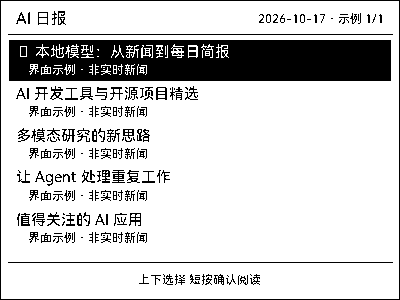
Collect AI news daily, read summaries and listen to briefs on NOTE4, and revisit past content saved on your computer.
Local Push SDK · Public source