Local app · NOTE4

Menu Board

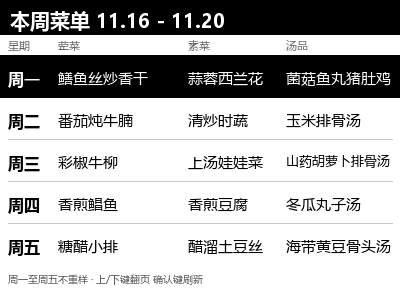
Send a weekday meal plan and a categorized shopping list to NOTE4. The current day is highlighted automatically. Plan meals around school menus and ingredients on hand, and use the device buttons to flip or refresh pages.

What it can do

Two 400×300 16-level grayscale pages for meals and shopping, with the current-day highlight updated at midnight
Up/down flips pages and confirm re-reads and refreshes the current page
The planner prioritizes ingredients on hand and consults the school menu to avoid repeating main ingredients

Install & use

Install the local application

Follow the repository README to build Menu Board and render two pages before connecting NOTE4.

Public source

NOTE4 monochrome · Chinese firmware 3.7.5 · Local Push SDK 0.2.0 · Rust stable, CMake, Python 3 + Pillow · Same LAN

For the monochrome NOTE4 with compatible local-push firmware already installed.

  1. Prepare the build environment

    Place Local Push SDK 0.2.0 beside the project as documented. Install Rust stable, CMake, Python 3 and Pillow, then run cargo build --release in the project directory.

  2. Generate the menu and shopping list

    Run python render_cards.py to generate the sample. For weekly updates, fill in school.txt and stock.txt, then run python weekly_gen.py followed by python render_cards.py to update the two images in pages.

  3. Send to NOTE4

    Enable standby Wi-Fi on NOTE4 and keep the host and device on the same LAN. Follow the README to run cargo run --release -- <device-IP> pages gray16 and keep the program running.

Get the Local Push SDK ↗

Give the task to Codex or another local AI and follow the current project README to install and verify it.

See the task for AI
https://gitee.com/gu-yajing/menu-board-note4
NOTE4 monochrome · Chinese firmware 3.7.5 · Local Push SDK 0.2.0 · Rust stable, CMake, Python 3 + Pillow · Same LAN
Place Local Push SDK 0.2.0 beside the project as documented. Install Rust stable, CMake, Python 3 and Pillow, then run cargo build --release in the project directory.
Run python render_cards.py to generate the sample. For weekly updates, fill in school.txt and stock.txt, then run python weekly_gen.py followed by python render_cards.py to update the two images in pages.
Enable standby Wi-Fi on NOTE4 and keep the host and device on the same LAN. Follow the README to run cargo run --release -- <device-IP> pages gray16 and keep the program running.
Check that both the menu and shopping list can be selected and that confirm refreshes updated content.

After installation, confirm this

Check that both the menu and shopping list can be selected and that confirm refreshes updated content.

Repository docs and sample images reviewed. The author reports testing on NOTE4. Copying the task does not run installation.

Frequently asked questions

Can the browser OCR run offline?

The screenshot is processed in the browser. The current tool loads the OCR library and related assets from a CDN, which must be reachable. You can also enter the school menu in school.txt and generate the plan on your computer.

Project & updates

Public repository. Documentation reviewed November 16, 2026. Consult the current version for compatibility.

Further improvements will be published in the GitHub repository. Before installing or upgrading, ask AI to read the current README and version changes, and preserve existing settings and data.

View source & instructions ↗
Local app · NOTE4Get started →

Your project details will be sent to support@zectrix.com for review before listing. Your email is used only to discuss your submission.