Liquid Glass Weather
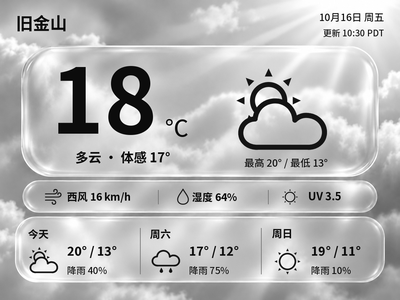
Generate Chinese or English glass-style weather cards with temperature, feels-like temperature and a three-day forecast. The current version previews and exports images on your computer first.
Local Push SDK · Public source
Local app · NOTE4
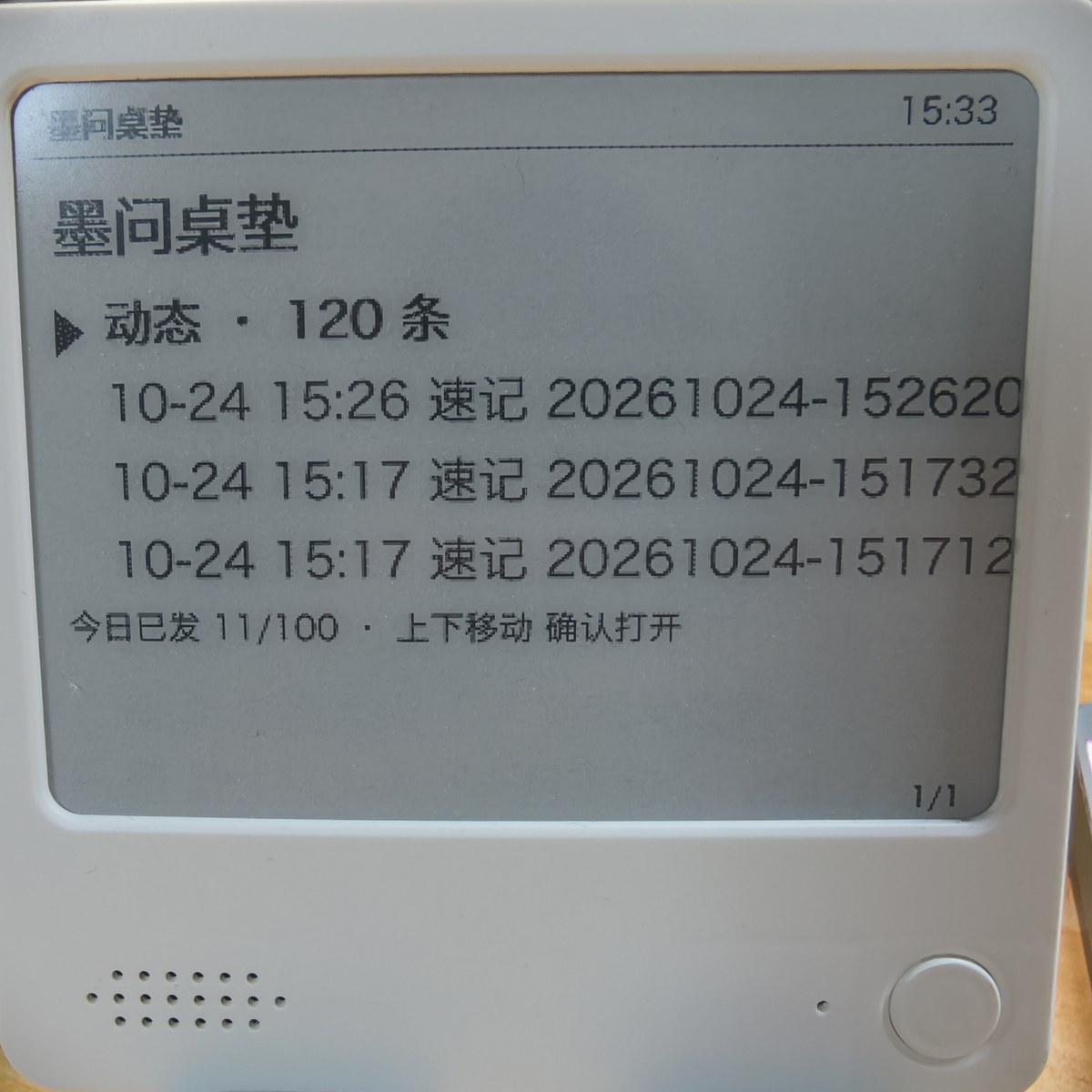
Turn NOTE4 into a desktop voice notepad and Mowen activity reader: hold confirm to speak, release to create a note, and use the buttons to browse followed activity, interactions and local voice-note records.

Install & use
The Rust application connects to NOTE4 through the public SDK. Build and check rendering first, then configure Mowen, optional AI services and the target device.
NOTE4 firmware 3.7.2 · macOS · Rust / CMake · Mowen Pro API key · Same LAN · Host must stay running
Audio upload currently uses macOS afconvert; other systems require transcoding adaptation. The main activity feed needs the signed-in Mowen desktop client and mocli. NOTE4 only; stop Hub, WeRead Ink or other programs using the same device connection before starting.
Prepare macOS, Rust stable, C/C++ tools and CMake, and check NOTE4 firmware 3.7.2. Clone the repository and run cargo test and cargo build --release; rendering tests write previews to a temporary directory. The SDK is fetched through Git. For CMake 4 or later, set CMAKE_POLICY_VERSION_MINIMUM=3.5 as documented.
For a new setup, copy config.example.toml to config.toml; preserve existing settings. Enter the Mowen Pro API key locally, keep auto_publish=false for private notes and set the target device. Use the signed-in Mowen desktop client for activity; configure an OpenAI-compatible AI service with speech transcription only if automatic text is wanted.
Keep NOTE4 on the same LAN and enable Wi-Fi during standby. Stop other device clients, confirm the target and preview, then run cargo run --release. Check the home screen, buttons and activity first; use an agreed test recording to verify upload, optional text and privacy. Configure launchd startup only when needed.
Give the task to Codex or another local AI and follow the current project README to install and verify it.
Install and verify Mowen Desk on this computer following the current README. https://github.com/hadronliu/mowen-desk https://github.com/hadronliu/mowen-desk/blob/main/README.md NOTE4 firmware 3.7.2 · macOS · Rust / CMake · Mowen Pro API key · Same LAN · Host must stay running Audio upload currently uses macOS afconvert; other systems require transcoding adaptation. The main activity feed needs the signed-in Mowen desktop client and mocli. NOTE4 only; stop Hub, WeRead Ink or other programs using the same device connection before starting. Prepare macOS, Rust stable, C/C++ tools and CMake, and check NOTE4 firmware 3.7.2. Clone the repository and run cargo test and cargo build --release; rendering tests write previews to a temporary directory. The SDK is fetched through Git. For CMake 4 or later, set CMAKE_POLICY_VERSION_MINIMUM=3.5 as documented. For a new setup, copy config.example.toml to config.toml; preserve existing settings. Enter the Mowen Pro API key locally, keep auto_publish=false for private notes and set the target device. Use the signed-in Mowen desktop client for activity; configure an OpenAI-compatible AI service with speech transcription only if automatic text is wanted. Keep NOTE4 on the same LAN and enable Wi-Fi during standby. Stop other device clients, confirm the target and preview, then run cargo run --release. Check the home screen, buttons and activity first; use an agreed test recording to verify upload, optional text and privacy. Configure launchd startup only when needed. Check SDK and actual firmware, preserve configuration and archives, and do not flash automatically. Enter keys locally and keep them out of chat and logs. Before the first real recording upload and note creation, explain the Mowen and optional AI destinations and agree on test content. Keep notes private; do not enable public posting without authorization. Verify home and activity navigation, test audio upload, optional transcription and default private status. Check that deletion affects only local records and stopping releases the device. This site reviewed the documentation and author photos; independent device testing remains pending. Provide start, stop, uninstall and data-preservation instructions. Without local execution access, provide steps without claiming installation is complete.
Verify home and activity navigation, test audio upload, optional transcription and default private status. Check that deletion affects only local records and stopping releases the device. This site reviewed the documentation and author photos; independent device testing remains pending.
After installation, check the actual result on your device. Copying this task does not execute installation.
With the default auto_publish=false, releasing the button creates a private Mowen note. Enabling the option makes it public automatically. Audio is uploaded to Mowen and, if AI is configured, sent to that service for transcription; records are also kept locally. Private notes are not local-only.
Activity refreshes every 60 minutes by default, with a five-minute cooldown for manual refresh. It comes from desktop mocli or the follows fallback using configured author UIDs. Some interfaces are not fully documented and may be rate-limited or stop working after changes.
No. Hold the down button on the home screen and confirm to remove only the local record. Delete the Mowen note manually in its mini-program.
The project requires an API key available to Mowen Pro members; current account permissions and quotas apply. Interaction and updates need the computer program to keep running, with one device manager at a time. Stop a foreground process with Ctrl+C before switching back to Hub or WeRead Ink.