Liquid Glass Weather
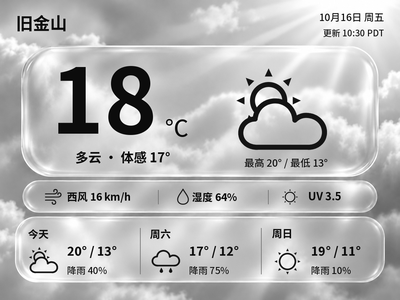
Generate Chinese or English glass-style weather cards with temperature, feels-like temperature and a three-day forecast. The current version previews and exports images on your computer first.
Local Push SDK · Public source
Local app · NOTE4
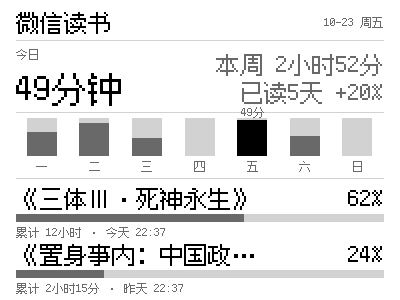
Keep your WeRead reading activity on your desk: today’s reading time, daily totals for the week and current book progress on a 400×300 pixel-style panel, refreshed on NOTE4 every 30 minutes by default.

Install & use
The project provides a Rust application and SDK sender. Build it following the README and tutorial, configure WeRead and preview the result before connecting the device.
NOTE4 firmware 3.7.2 · Rust stable / CMake · WeRead API key · Same LAN · Host must stay running
The author reports device validation on Apple Silicon macOS; Linux and Windows are unverified. For NOTE4 only, not NOTE4C. Daemon mode holds the device management connection; stop Hub or other senders using the device before starting.
Check NOTE4 firmware 3.7.2 and prepare Rust stable, C/C++ build tools and CMake. Clone hadronliu/weread-ink and itopinion/zectrix-local-push-sdk into the same parent directory; the project depends on ../zectrix-local-push-sdk.
Run cargo test and cargo build --release in the project directory, then cargo run --example sample to create sample.png. The sample needs no API key or device; check the pixel text, weekly chart and book progress layout.
Get an API key from https://weread.qq.com/r/weread-skills. For a new setup, copy .env.example to .env and set WEREAD_API_KEY and optional WEREAD_DEVICE_TARGET; preserve existing settings. Run cargo run --bin weread-ink -- --dry-run dashboard.png to check data and rendering. Keep the key local.
Keep NOTE4 on the same LAN and enable Wi-Fi during standby. Stop Hub and other device clients, verify the IP and preview, then run cargo run --bin weread-ink -- --target <device-IP> for the first push. Use --daemon for scheduled updates at the default 1800-second interval; follow the tutorial for macOS launchd startup.
Give the task to Codex or another local AI and follow the current project README to install and verify it.
Install and verify MoDu (weread-ink) on this computer following README and TUTORIAL.md. https://github.com/hadronliu/weread-ink https://github.com/hadronliu/weread-ink/blob/main/TUTORIAL.md NOTE4 firmware 3.7.2 · Rust stable / CMake · WeRead API key · Same LAN · Host must stay running The author reports device validation on Apple Silicon macOS; Linux and Windows are unverified. For NOTE4 only, not NOTE4C. Daemon mode holds the device management connection; stop Hub or other senders using the device before starting. Check NOTE4 firmware 3.7.2 and prepare Rust stable, C/C++ build tools and CMake. Clone hadronliu/weread-ink and itopinion/zectrix-local-push-sdk into the same parent directory; the project depends on ../zectrix-local-push-sdk. Run cargo test and cargo build --release in the project directory, then cargo run --example sample to create sample.png. The sample needs no API key or device; check the pixel text, weekly chart and book progress layout. Get an API key from https://weread.qq.com/r/weread-skills. For a new setup, copy .env.example to .env and set WEREAD_API_KEY and optional WEREAD_DEVICE_TARGET; preserve existing settings. Run cargo run --bin weread-ink -- --dry-run dashboard.png to check data and rendering. Keep the key local. Keep NOTE4 on the same LAN and enable Wi-Fi during standby. Stop Hub and other device clients, verify the IP and preview, then run cargo run --bin weread-ink -- --target <device-IP> for the first push. Use --daemon for scheduled updates at the default 1800-second interval; follow the tutorial for macOS launchd startup. Recheck current source, SDK compatibility and actual firmware; do not flash firmware automatically. Confirm the target and preview before the first device push; configure daemon or startup only as requested. Enter keys locally and keep them out of chat and logs. Check today’s time, weekly chart and current books, and observe the actual NOTE4 refresh. Verify periodic updates, reconnection and connection release after stopping. This listing reviews project information; it does not replace testing on your device. Provide start, stop and uninstall instructions and preserve existing settings. Without local execution access, provide steps without claiming installation or device validation is complete.
Check today’s time, weekly chart and current books, and observe the actual NOTE4 refresh. Verify periodic updates, reconnection and connection release after stopping. This listing reviews project information; it does not replace testing on your device.
After installation, check the actual result on your device. Copying this task does not execute installation.
The device uses the local SDK and needs no ZECTRIX cloud API key. WeRead data requires its own official API key; this website does not collect it.
MoDu displays reading statistics and book progress, not book text. It updates every 30 minutes by default, adjustable with --interval; the WeRead source may also lag. The preview here uses the author’s sample data.
Automatic updates require the host and app to stay running. Daemon mode holds the connection; stop MoDu before using another app. Use Ctrl+C for a foreground process or the documented launchctl bootout command for the macOS service, then start Hub or another client.