Local app · NOTE4

Sports Board Pro

Football fixtures, recent results, featured matches and dynamic F1 pages for monochrome NOTE4. Updates every 10 minutes and refreshes only when content changes. Supports button navigation, voice Q&A and confirmed team changes; voice features require additional environment setup.

What it can do

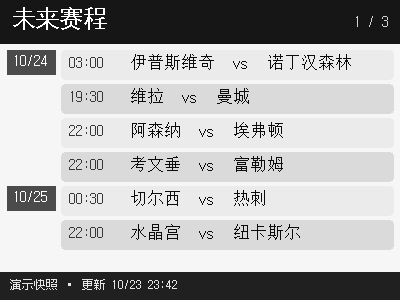
Fixtures, results and featured events; F1 appears around race week, with 3–5 dynamic pages
Fetches sports data every 10 minutes and refreshes the visible screen only when content changes
Button navigation and hold-to-record; common questions are handled locally and open-ended questions use Hermes
Manage followed teams with confirmation for voice changes; includes a time-limited Hangzhou Marathon page

Install & use

Install the local application

Generate and verify the dashboard first, then configure voice models, tools and paths.

Public source

Monochrome NOTE4 · Firmware 3.7.2 / SDK 0.1.0 · Always-on Linux host · Rust / Python 3.12 · Your own Chinese font

The deployment guide targets Linux and NOTE4, not NOTE4C. Clone the official SDK separately beside the project. Keep the host running on the same LAN and close other clients using the device.

  1. Prepare the environment and SDK

    Follow DEPLOY.md to install Rust stable, CMake, a C/C++ compiler and Python 3.12 on Linux. Place zectrix-local-push-sdk beside the repository, install requirements.txt in a virtual environment, and set FONT to a Chinese font you may use.

  2. Choose teams and generate pages

    For first setup, create runtime/team_selection.json from team_selection.example.json or use the team-picker page on port 8790. Run update_live.sh and inspect runtime/pages and Chinese text. Fetching sports data requires internet access; the current data sources do not require keys.

  3. Connect your NOTE4

    Use the matching firmware and keep Wi-Fi on during standby. Run cargo build in host, then start the host with your own device IP following the guide. Check the three basic pages, navigation, refresh and updates. Voice scripts still contain author-specific absolute paths; configure faster-whisper, Hermes, Edge TTS / Piper and validate each step separately.

Get the Local Push SDK ↗

Give the task to Codex or another local AI and follow the current project README to install and verify it.

See the task for AI
https://github.com/taqulalee/zectrix-sports-board
https://github.com/taqulalee/zectrix-sports-board/blob/main/DEPLOY.md
Monochrome NOTE4 · Firmware 3.7.2 / SDK 0.1.0 · Always-on Linux host · Rust / Python 3.12 · Your own Chinese font
The deployment guide targets Linux and NOTE4, not NOTE4C. Clone the official SDK separately beside the project. Keep the host running on the same LAN and close other clients using the device.
Follow DEPLOY.md to install Rust stable, CMake, a C/C++ compiler and Python 3.12 on Linux. Place zectrix-local-push-sdk beside the repository, install requirements.txt in a virtual environment, and set FONT to a Chinese font you may use.
For first setup, create runtime/team_selection.json from team_selection.example.json or use the team-picker page on port 8790. Run update_live.sh and inspect runtime/pages and Chinese text. Fetching sports data requires internet access; the current data sources do not require keys.
Use the matching firmware and keep Wi-Fi on during standby. Run cargo build in host, then start the host with your own device IP following the guide. Check the three basic pages, navigation, refresh and updates. Voice scripts still contain author-specific absolute paths; configure faster-whisper, Hermes, Edge TTS / Piper and validate each step separately.
Check pagination, Chinese text, buttons and scheduled updates; test recording, recognition, Q&A and audible playback separately in your environment.

After installation, confirm this

Check pagination, Chinese text, buttons and scheduled updates; test recording, recognition, Q&A and audible playback separately in your environment.

Source and demo reviewed · Device and voice validation pending. Copying the task does not run installation.

Frequently asked questions

Is this a live score ticker?

No. The dashboard updates every 10 minutes and mainly shows upcoming fixtures and completed results; ongoing games are excluded from those two pages. Questions about ongoing games use Hermes online search. F1 appears only within seven days of the next race.

Is voice ready out of the box?

Additional setup is required. requirements.txt currently lists only Pillow; install voice models and tools and replace author-specific paths. Recognition uses local faster-whisper, open questions use the configured Hermes service, and online Edge TTS has local Piper fallback. Questions or spoken text may be sent to the configured online services.

Is the marathon page permanent?

No. The current code has a temporary 2026 Hangzhou Marathon page that expires at 12:00 on 2 November 2026, Beijing time. Morning reminders stop from 2 November.

What do the preview and verification cover?

The image is the author’s 400×300 fixture demo, with sample dates and matches, not current fixtures or our device photo. Source and deployment documentation were reviewed; no NOTE4 connection or complete voice flow was tested. No root project license was found; public source does not imply unrestricted redistribution of all code and assets.

Project & updates

Public repository. Information reviewed on 2026-10-29; support depends on the actual version.

Further improvements will be published in the GitHub repository. Before installing or upgrading, ask AI to read the current README and version changes, and preserve existing settings and data.

View source & instructions ↗
Local app · NOTE4Get started →

Your project details will be sent to support@zectrix.com for review before listing. Your email is used only to discuss your submission.