Liquid Glass Weather
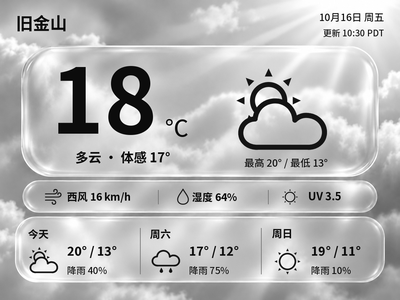
Generate Chinese or English glass-style weather cards with temperature, feels-like temperature and a three-day forecast. The current version previews and exports images on your computer first.
Local Push SDK · Public source
Local app · NOTE4
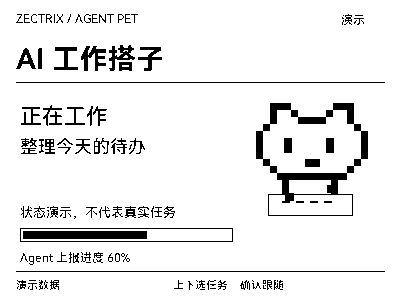
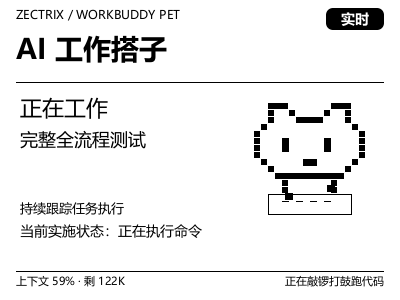
A NOTE4 pixel pet for WorkBuddy. Running on Windows, it follows local tasks, shows status, progress and context usage, and plays alerts when confirmation is needed or work finishes.

Install & use
Download the single-file Windows x64 executable, or follow the README to build when modifying code. After checking the first frame, enable background task following.
Windows 10/11 x64 · WorkBuddy · Monochrome NOTE4 · SDK-compatible firmware · Same LAN
The author currently specifies SDK 0.1.0 and firmware 3.7.2. NOTE4C is unsupported; macOS/Linux are unverified. This is a continuously running desktop app, not firmware. We reviewed public documentation only; Windows installation and device operation were not independently tested.
Download the Windows x64 executable from Releases and verify SHA256SUMS.txt. Source builds require Rust MSVC, CMake, Visual Studio C++ Build Tools and the official SDK in a sibling directory. Follow the current README.
Confirm firmware/SDK compatibility, the same LAN and Wi-Fi retention in standby. Stop other device clients. Run check --target <IP>, wait at least 9 seconds, then push --target <IP> to inspect the display.
Run autostart on --target <IP> to install the current-user startup entry and start following. Check watchdog and daemon status with autostart status. Stop with autostart off; preserve settings and task history when upgrading.
Give the task to Codex or another local AI and follow the current project README to install and verify it.
https://github.com/MuskCheng/zectrix-workbuddy-pet https://github.com/MuskCheng/zectrix-workbuddy-pet/blob/main/README.md Windows 10/11 x64 · WorkBuddy · Monochrome NOTE4 · SDK-compatible firmware · Same LAN The author currently specifies SDK 0.1.0 and firmware 3.7.2. NOTE4C is unsupported; macOS/Linux are unverified. This is a continuously running desktop app, not firmware. We reviewed public documentation only; Windows installation and device operation were not independently tested. Download the Windows x64 executable from Releases and verify SHA256SUMS.txt. Source builds require Rust MSVC, CMake, Visual Studio C++ Build Tools and the official SDK in a sibling directory. Follow the current README. Confirm firmware/SDK compatibility, the same LAN and Wi-Fi retention in standby. Stop other device clients. Run check --target <IP>, wait at least 9 seconds, then push --target <IP> to inspect the display. Run autostart on --target <IP> to install the current-user startup entry and start following. Check watchdog and daemon status with autostart status. Stop with autostart off; preserve settings and task history when upgrading. After installation, verify task following, context usage, confirmation alerts, completion sounds and device release on stop. This guide is documentation-based, not evidence of independent hardware testing.
After installation, verify task following, context usage, confirmation alerts, completion sounds and device release on stop. This guide is documentation-based, not evidence of independent hardware testing.
After installation, check the actual result on your device. Copying this task does not execute installation.
No. The device displays reminders; confirmations must be handled on the computer. Up/down selects tasks or pages, and confirm returns to the home view and automatic following.
It reads status metadata from local WorkBuddy session files, logs and database. This is not a stable official status API, so format changes may require adaptation. Credit balances and billing data are not displayed.