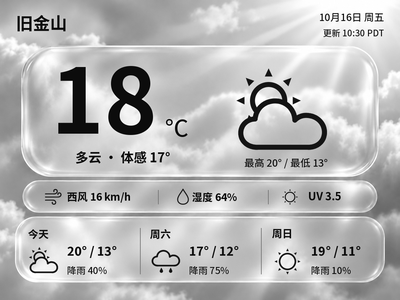
Liquid Glass Weather
Generate Chinese or English glass-style weather cards with temperature, feels-like temperature and a three-day forecast. The current version previews and exports images on your computer first.
Local Push SDK · Public source
Local app · NOTE4
Sign in to WeRead on your Mac and read book pages on NOTE4, using its buttons to turn pages. E-paper contrast and margins are optimized, with monochrome and grayscale output.

Install & use
Install on your Mac using the project scripts, sign in to WeRead in the browser, then connect NOTE4.
Mac · Node.js 18+ / npm · Rust stable / CMake / Xcode Command Line Tools · NOTE4 on the same LAN
The author has tested macOS only, for NOTE4, not NOTE4C. The bundled SDK is 0.1.0 and its manifest lists firmware 3.7.2. Connection and four-level grayscale push were verified on the current Mac and NOTE4; other systems and firmware versions require separate checks.
Install Node.js 18+, npm, Rust stable, CMake and Xcode Command Line Tools per the README. Clone the repository and run bash scripts/setup.sh to download Chromium and compile the app. Initial setup needs internet access; this is not a ready-to-run .app.
For first-time setup, copy .env.example to .env and set ZECTRIX_IP; preserve existing settings. Keep the Mac and NOTE4 on the same LAN, close other device clients, then run bash scripts/start.sh. Defaults are mono with prefetch disabled to avoid advancing pages early.
Scan the QR code in the browser, open a book, and test page buttons and refresh. To change books, press ⌘L in the same browser, open https://weread.qq.com, close the old book tab, open the new book and press confirm. Close the browser or press Ctrl+C to stop.
Give the task to Codex or another local AI and follow the current project README to install and verify it.
Install WeRead Reading Companion on Mac following the current README and TUTORIAL.md. Preserve existing settings and login data; do not automatically upgrade firmware. https://github.com/hadronliu/weread-zectrix-bridge https://github.com/hadronliu/weread-zectrix-bridge/blob/main/TUTORIAL.md Mac · Node.js 18+ / npm · Rust stable / CMake / Xcode Command Line Tools · NOTE4 on the same LAN The author has tested macOS only, for NOTE4, not NOTE4C. The bundled SDK is 0.1.0 and its manifest lists firmware 3.7.2. Connection and four-level grayscale push were verified on the current Mac and NOTE4; other systems and firmware versions require separate checks. Install Node.js 18+, npm, Rust stable, CMake and Xcode Command Line Tools per the README. Clone the repository and run bash scripts/setup.sh to download Chromium and compile the app. Initial setup needs internet access; this is not a ready-to-run .app. For first-time setup, copy .env.example to .env and set ZECTRIX_IP; preserve existing settings. Keep the Mac and NOTE4 on the same LAN, close other device clients, then run bash scripts/start.sh. Defaults are mono with prefetch disabled to avoid advancing pages early. Scan the QR code in the browser, open a book, and test page buttons and refresh. To change books, press ⌘L in the same browser, open https://weread.qq.com, close the old book tab, open the new book and press confirm. Close the browser or press Ctrl+C to stop. After installation, check book display, page buttons, refresh and connection release on exit; verify other devices and environments separately.
After installation, check book display, page buttons, refresh and connection release on exit; verify other devices and environments separately.
Push verified on the current Mac / NOTE4. Copying the task does not run installation.
This is a separate project by the same author. WeRead Ink shows reading time and progress; this app displays book text with physical page-turn buttons. It uses QR login and needs neither a WeRead API key nor a ZECTRIX Cloud API key.
Cookies stay in browser-controller/.user-data/ on your Mac; screenshots and the last book URL are also stored locally. Do not upload them. WeRead handles cloud progress; this tool does not guarantee real-time cross-device consistency or implement automatic book switching and progress-conflict resolution.
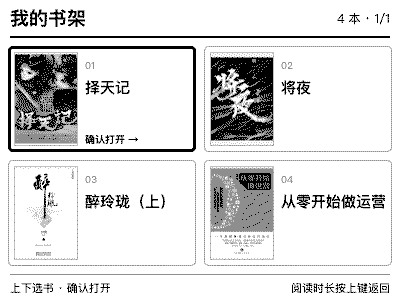
The Mac, browser and app must remain running while reading. Disconnection may require restarting the app; website changes and special layouts may affect rendering. The image shows a bookshelf added locally, exported from actual NOTE4 four-level grayscale push data, not a device photo. The reviewed upstream download does not include this bookshelf feature.